BREAKNAV30 For Breakdance builders
Reach any page, template, or block in two clicks.
BreakNav adds a quick-access menu to the WordPress admin bar so you stop digging four levels deep for the Template you opened yesterday. Free baseline does the navigation. Pro adds pinning, search, custom links, and a settings panel built for the way you actually work.
Questions? Reach us at support@breaknav.com
The admin bar, but useful.
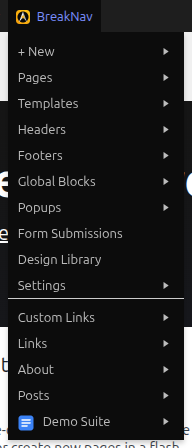
Breakdance's WordPress UI hides everything behind submenus. Editing a Header means: hover the Breakdance menu, wait for the flyout, click Templates, click Headers, find the one you want. Same for Global Blocks, Popups, Form Submissions, anything.
BreakNav puts the last 10 of each — pages, templates, headers, footers, global blocks, popups, CPTs — one click away from anywhere in the admin bar. The free version covers the navigation. The Pro version makes it yours.
Free baseline, always on
- Quick-access menu of recent Breakdance-edited content
- Frontend "Edit This Page" shortcut on any builder page
- "View All" jump-link at the bottom of every listing
- Hover any row to reveal View and WP-Edit buttons
- Auto-detects the Headspin plugin and surfaces its menu inline inside the navigator.
What Pro adds
Activating a license unlocks everything below.
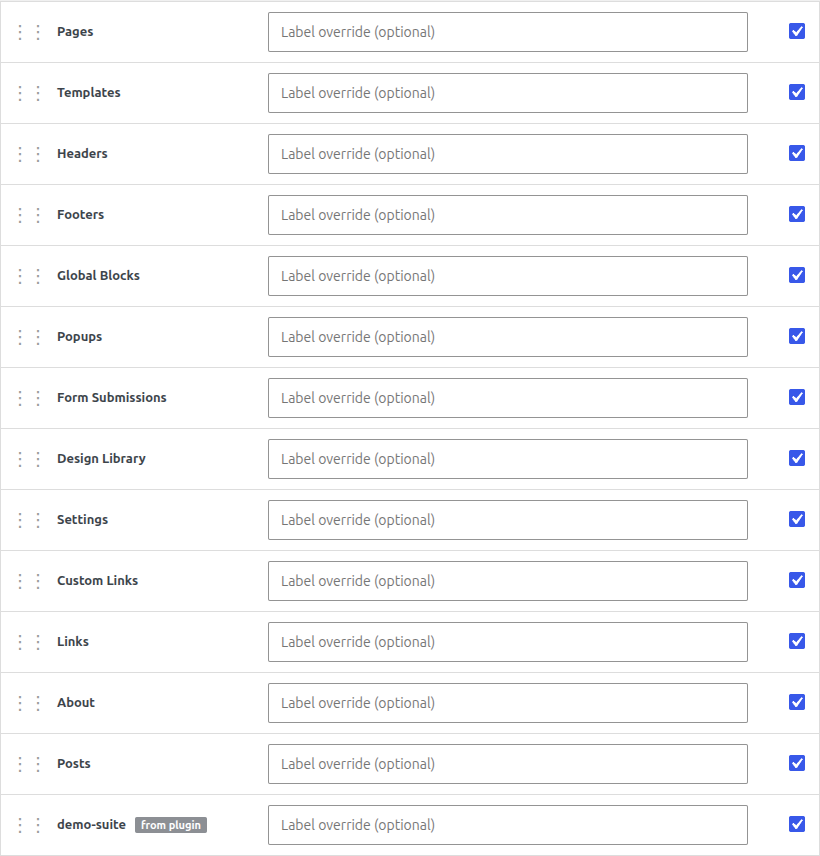
Drag-to-reorder sections
Rearrange menu sections in any order. Pages first today, Templates first tomorrow.
Enable / disable per section
Hide sections you never touch — Popups, Form Submissions, Design Library. The menu stays tight.
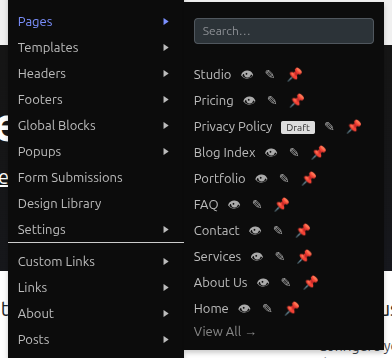
Pin items to the top
Click the pin on any row to lock it above the rest. The pages you edit weekly stop drifting out of view.
Live search per listing
Type to search the full content type, not just the visible window. AJAX-debounced, no page reload.
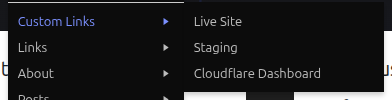
Custom Links submenu
Add your own URLs — staging site, Cloudflare dashboard, internal docs — straight into the navigator.
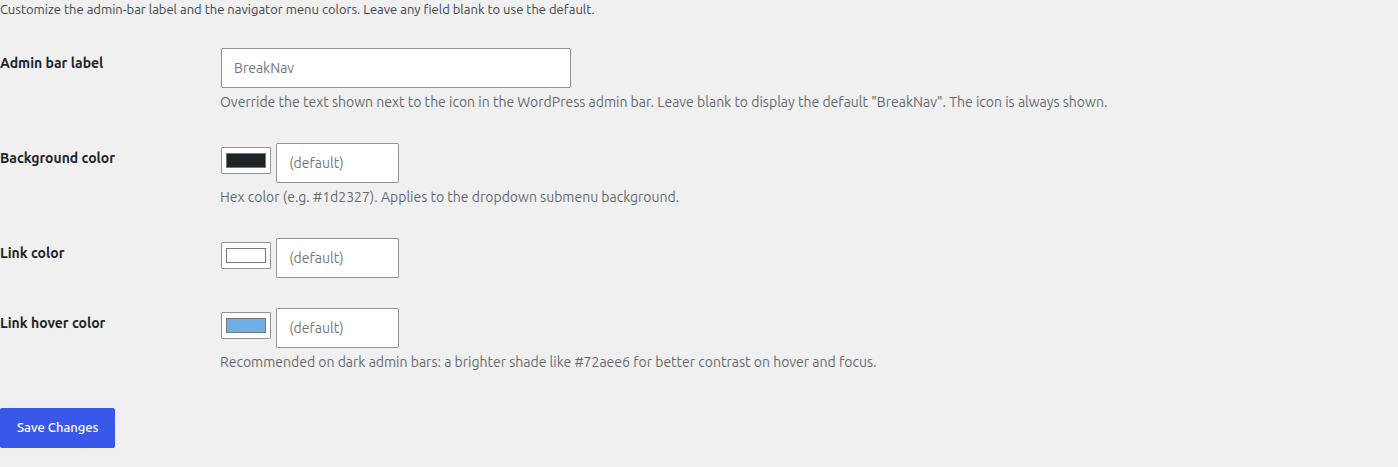
Custom admin bar label
Rename the trigger from "BreakNav" to whatever your project calls it. The icon stays.
Rename any section
Override "Pages" to "Landing Pages", "Global Blocks" to "Reusable". Per-section, with sensible defaults.
+ New submenu
Create a new Page, Post, Template, Header, Footer, or Block from a single dropdown.
Draft + scheduled badges
See Draft, Scheduled, Private chips next to non-published rows at a glance.
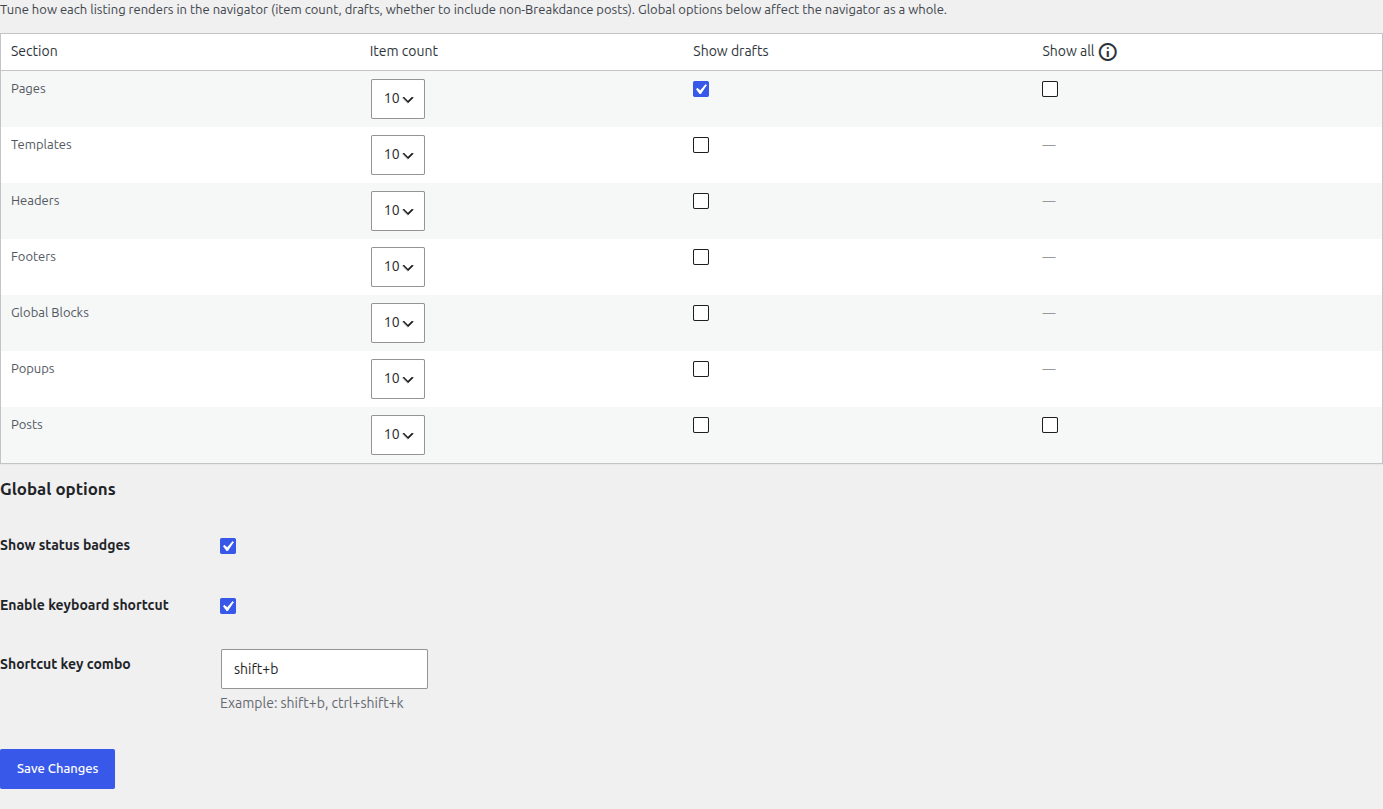
Configurable item count
Show 5, 10, 25, or 50 recent items per listing. Match the density to the project.
Keyboard shortcut
Shift+B (or any combo) toggles the navigator from anywhere — admin or frontend.
Color customization
Override background, link, and hover colors to match the rest of your admin theme.
Plus: export/import settings as JSON · Developer integration API · Auto-discovery of any Breakdance-enabled CPT.
Reorder, rename, hide. Make the menu yours.
Drag sections into the order that matches the way you work. Rename "Pages" to "Landing Pages", "Global Blocks" to "Reusable" — whatever makes sense for the project. Hide sections you never touch. The menu stays tight and personal.
Every change is saved per-site. Export the config as JSON, import it on another install, and you're set up in seconds.
Pin what matters. Search the rest.
Pin the three pages you edit weekly. They lock to the top of the Pages listing — across sessions, across builds, until you unpin.
Need something deeper? Start typing in the search input. AJAX searches the entire content type, not just the last 10 items in the dropdown. Debounced 250ms so it doesn't fire on every keystroke.
Custom links and your own label.
Add the URLs you keep pasting into the address bar — staging environment, Cloudflare dashboard, your hosting panel, the live site — directly into the admin bar. Label, URL, open-in-new-tab toggle. That's it.
Rename the trigger itself, too. If "BreakNav" feels too generic for your studio, the Design tab has a label override. Set it to "Project Hub", "Site Tools", whatever. The icon stays put.
Make it look like yours.
Override the admin-bar label so the trigger says "Studio Nav", "Project Hub", or whatever fits the project. Pick background, link, and hover colors to match your admin theme or client brand.
Three color fields, one text input. No CSS, no code. Changes apply on save and persist across sessions.
Control what you see and how much.
Set the number of recent items per listing: 5, 10, 25, or 50. Toggle draft visibility so unpublished content shows up with status badges, or hide it entirely to keep the menu clean.
The "Show All" checkbox includes pages and posts that weren't built with Breakdance, so nothing hides from the navigator. The keyboard shortcut binding is here too. Every option has a sensible default; change only what matters.
One price. Every site you build.
BREAKNAV30 for 30% off with code BREAKNAV30
- Unlimited sites
- All Pro features
- Updates + security patches for the licensed period
- 14-day refund window via CREEM
Want the free version first? Download from GitHub
No trial, no per-site multiplier, no upgrade tier. Cancel any time; the license stops renewing and degrades to free-equivalent.
Requirements
BreakNav is an independent companion plugin. Not affiliated with or endorsed by Breakdance.
Recent releases
Pulled from GitHub at build time. Full history at Changelog
BreakNav Pro v1.3.6 — surface support@breaknav.com in the plugin
Full changelogBreakNav Pro v1.3.5 — tighter, tinted search results
Full changelogShip your own section in the navigator.
Use the breaknav_integrations filter to register your plugin's pages — label, icon, children — and they appear automatically inside the admin-bar dropdown. No UI code, no CSS, no admin-menu hooks.
add_filter( 'breaknav_integrations', function ( $i ) {
$i['my-plugin'] = array(
'label' => 'My Plugin',
'icon' => plugin_dir_url( __FILE__ ) . 'icon.svg',
'url' => admin_url( 'admin.php?page=my-plugin' ),
'children' => array(
array( 'label' => 'Dashboard', 'url' => admin_url( '...' ) ),
array( 'label' => 'Settings', 'url' => admin_url( '...' ) ),
),
);
return $i;
} );