Developer integration
Use the breaknav_integrations filter to register your plugin's own section inside the BreakNav admin-bar navigator — label, icon, and child links — with zero UI code.
What this is
BreakNav Pro exposes a single WordPress filter — breaknav_integrations — that any active plugin or theme can hook into. When BreakNav renders the admin-bar dropdown, it merges your entries into the navigator alongside the built-in sections. The site owner can then reorder, rename, or hide your section from the General settings tab, same as any other section.
No JavaScript, no CSS, no admin-menu hacking. Return an array, and you're in.
Filter contract
Hook into the filter from your plugin's main file or any file that loads before admin_bar_menu:
add_filter( 'breaknav_integrations', function ( $integrations ) {
    $integrations['acme-forms'] = array(
        'label'    => 'Acme Forms',
        'icon'     => plugin_dir_url( __FILE__ ) . 'icon.svg',
        'url'      => admin_url( 'admin.php?page=acme-forms' ),
        'children' => array(
            array(
                'label' => 'All Forms',
                'url'   => admin_url( 'admin.php?page=acme-forms' ),
            ),
            array(
                'label' => 'Submissions',
                'url'   => admin_url( 'admin.php?page=acme-forms&tab=subs' ),
            ),
            array(
                'label'  => 'Docs',
                'url'    => 'https://example.com/docs',
                'target' => '_blank',
            ),
        ),
    );
    return $integrations;
} );
The array key is your slug. Use a stable, kebab-case identifier — the site owner's per-integration settings (enabled, label override, ordering) are keyed by it, so changing the slug on upgrade resets them.
Field reference
| Field | Type | Required | Notes |
|---|---|---|---|
label | string | Yes | Display name in the dropdown. The site owner can override this in Settings. |
icon | string (URL) | No | Absolute URL to a 16x16 SVG or PNG. Falls back to a generic icon. |
url | string (URL) | Yes | Click destination for the section header in the dropdown. |
children | array | No | Up to 10 child links. Each: label (required), url (required), target (optional, e.g. '_blank'). |
Rules and sanitization
- Your callback receives the current
$integrationsarray and must return it — failing to return breaks all integrations, not just yours. - Use
admin_url()for admin links andplugin_dir_url()for asset URLs. Hard-coded paths break on subdirectory installs. - Maximum 10 children per integration. BreakNav silently drops extras.
- BreakNav escapes all labels and URLs before rendering. You do not need to call
esc_html()oresc_url()— but it doesn't hurt. - The filter runs on every admin page load (it's in the
admin_bar_menuaction). Keep your callback lightweight — no database queries, no remote API calls. - Icons render at 16x16. SVGs must have a
viewBox; raster images should be exactly 16x16 or 32x32 for Retina.
What it looks like
A third-party integration rendered inside the navigator dropdown:
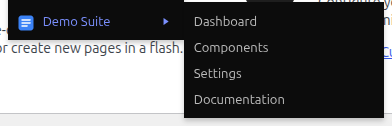
Working example
A complete, paste-able plugin file you can drop into wp-content/plugins/your-plugin/your-plugin.php:
<?php
/**
 * Plugin Name: My Demo Integration
 * Description: Adds a section to the BreakNav navigator.
 * Version: 1.0.0
 */
if ( ! defined( 'ABSPATH' ) ) { exit; }

add_filter( 'breaknav_integrations', function ( $i ) {
    $i['my-demo'] = array(
        'label'    => 'My Demo',
        'icon'     => plugin_dir_url( __FILE__ ) . 'icon.svg',
        'url'      => admin_url( 'admin.php?page=my-demo' ),
        'children' => array(
            array(
                'label' => 'Dashboard',
                'url'   => admin_url( 'admin.php?page=my-demo' ),
            ),
            array(
                'label' => 'Settings',
                'url'   => admin_url( 'admin.php?page=my-demo-settings' ),
            ),
            array(
                'label'  => 'Docs',
                'url'    => 'https://example.com/docs',
                'target' => '_blank',
            ),
        ),
    );
    return $i;
} );
Activate the plugin, then go to Settings → BreakNav → General, find your section in the list, toggle it on, click Save. The navigator dropdown picks it up immediately on the next page load.
Source of truth
The canonical reference for the integration API lives in docs/integrations.md inside the plugin. This page is a condensed version for quick reference.